

Sellers on StockX will begin receiving daily payouts as a single cumulative amount for all successfully verified orders (including Early Seller Payout and Flex sales for eligible Sellers), instead of receiving a payout after each item’s sale.
Scheduled Payouts allow Sellers to save on fees associated with their payout method, depending on the country and currency, as well as fees associated with cash outs and wire transfers.
For every scheduled payout, Sellers will receive a corresponding email once the transaction has been completed. The email will show a preview of the items included in the payout. In addition, you will find the statement ID of each scheduled payout as well as the transaction ID (s), which can be used to reference transfers in Hyperwallet, Finally, the email will have a link to a .pdf statement which will detail all orders paid in this scheduled payout.
Please note, if the scheduled payout contains multiple transactions, an email per transaction will be sent.
Additional details:
- Payouts will be added to a batch until 11:30 PM EST daily with the cumulative total amount being processed at or around 11:59 PM EST.
- Large-volume Sellers may receive more than one payout if the payout amount exceeds any limits set by your financial institution and/or our payout provider.
- Any failures will be retried in the same batch as the original transaction.
Payout details, including an itemized list of the sales within each payout, provider transaction ID, and total invoice amount will be provided in your Seller export, which can be found in your Selling profile.
There are several ways a Seller can reconcile their orders to cash receipts:
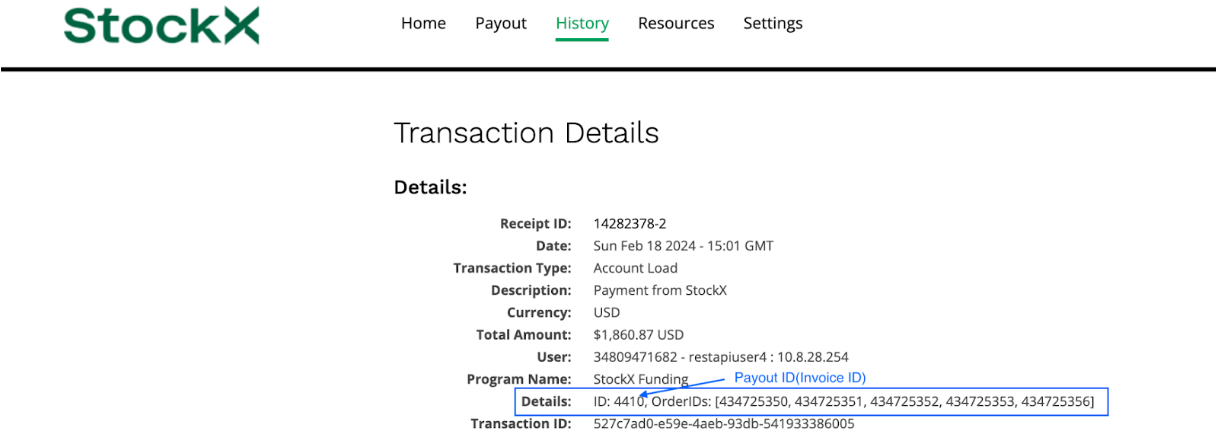
First, upon each payout sent from StockX to a Seller’s Hyperwallet account, the Seller will receive an email confirming the payout from Hyperwallet. In this email, the invoice ID will be referenced in the Order ID section, along with any applicable order IDs (within capacity limits):
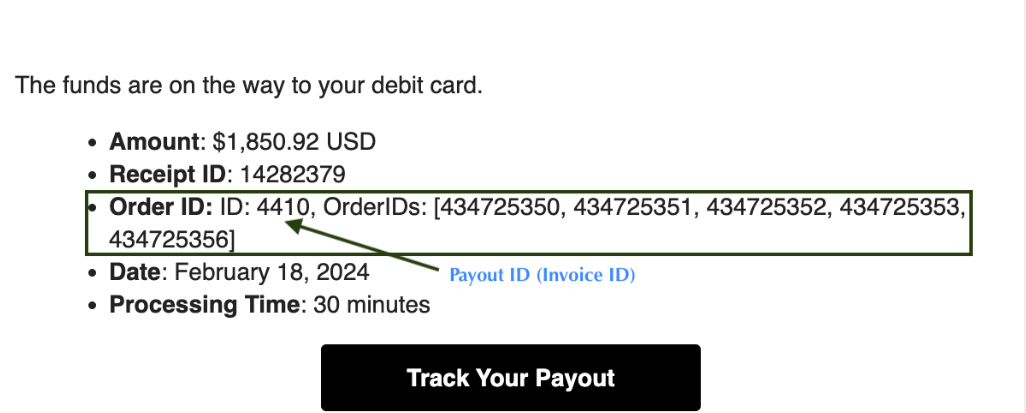
Next, this invoice ID can be tied back to the Payout ID section in the Seller export download. This download includes detailed item information, order ID, and individual payout amounts.
Lastly, Sellers will find information about individual transactions, amounts, cashout location, and date in the History download located in your Pay Portal. The Invoice ID located in the Description Notes can be tied back to the Payout ID column in the seller export:
In the future, Sellers will be able to select the payout time. We will provide updates as additional payout features are added.
For additional information on Seller payouts, please visit our Help Center.